What happened?
As I was working around to create my own e-mail server (mostly to set a e-mail bot to send me Dilbert comics everyday), I found a pretty annoying bug on my router’s webapp:
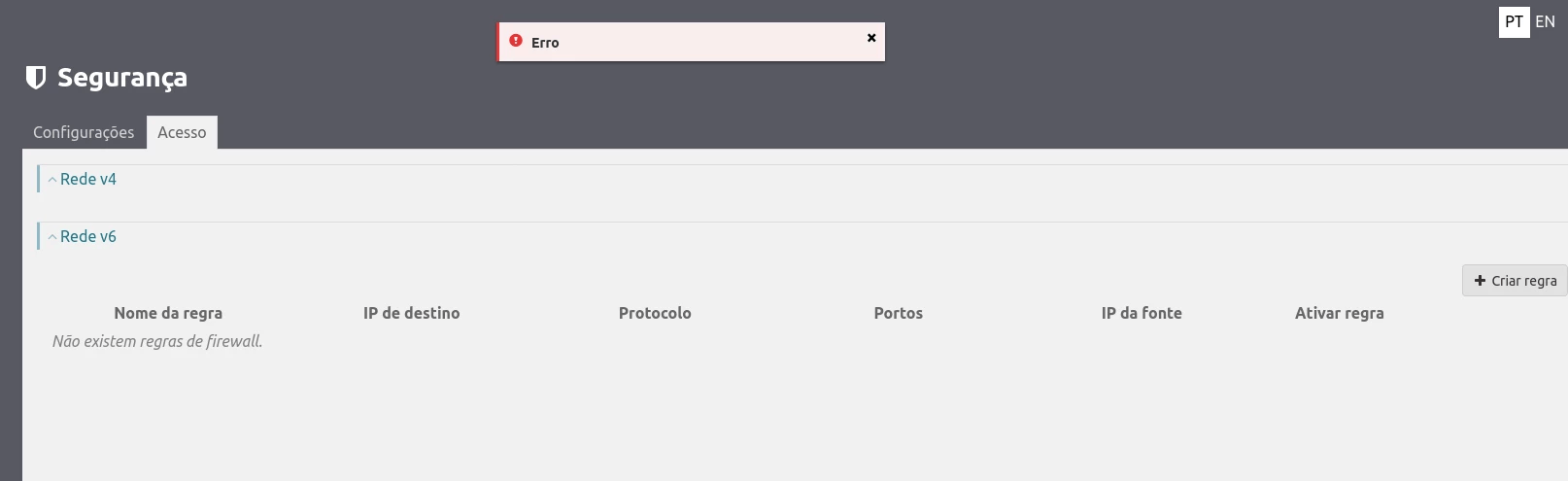
The access to IPv4 port forwarding was blocked. Supposedly a bug on the firmware - a bug that has been going on for over 4 months now, with no solution at sight.
How to solve it?
To retake control of your ports back again, you have to login remotely into your router as such, as explained in this post by the great Marcos Alves:
ssh MEO-XXXXX@192.168.1.254
Using the username and password provided on the router sticker.
Now go to the virtual server directory:
cd nat/virtual-servers
And now you can open and close ports with:
#create (one liner)
create --ext-port-start=<ExtPort>\
--int-port-start=<IntPort>\
--protocol=<TCP, UDP or TCP/UDP> --server-ip=<IP>\
--server-name=<name> --wan-intf=erouter0
#remove (one liner too)
remove --ext-port-start=<ExtPort>\
--int-port-start=<IntPort>\
--protocol=<TCP, UDP or TCP/UDP> --server-ip=<IP>
I also leave here other useful commands:
cd /device-info # go to the device info directory
show # show current forwading or device-info
Why are you so mad?
Because I do not expect everyone to feel comfortable around a terminal! Or maybe not even wanting to use one! The internet should be a democratic space, accessible to all and I think a WebApp/GUI is much more friendly to the common user/newb.
Althought this can be seen as an exercise in learning - This does not excuse an ISP to remove features, much less features that without them their users can be harmed.
Additionally this shows one of the nastiest things going on on the tech sphere right now - We the people, are not in control of the technology we are using - first they remove the WebApp, one day the (already stunted) terminal interface, and finally port forwarding in total.
I hope MEO fixes this bug soon, and reviews its stance on internet freedom!
Signing off!
Tech